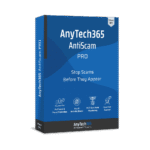
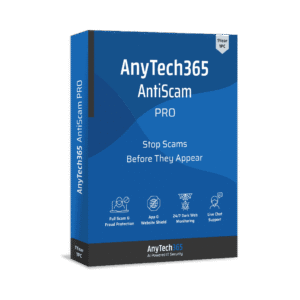
AnyTech365 AntiScam PRO is normally priced at $55 per year, and for a limited time you can get a 1‑year license for free via the Giveaway tab while the promotion lasts.
Available now: Free 1-year License for a Limited Time!
To access the giveaway, kindly provide your email address. Please refrain from closing this page after signing in to receive instructions on how to access the offer at no cost.
Also, check out the latest giveaways that are available here on the giveaway page.
AnyTech365 AntiScam PRO : 1-year License (Giveaway #5)
Phishing Protection Browser Extension, Dark Web Monitoring, Identity Theft Defense
HINTS:
To proceed, simply click the BUY NOW button in the offering box, and you'll download the exclusive installation file.
After downloading, install it and launch the program.
Please note: This giveaway is for new users only. If you’ve already registered with AnyTech365, please use a different email address to receive the full version.
Create an account by clicking the profile icon in the top right corner, pick 'Create Account' to start the registration process.
Fill in the form with your data and make up a password, click 'Register'. Check your email for the verification code and verify the account.
Tip: You can use any phone number—or just 000000—if you don’t want to enter your real number or don’t have one.
Once the account verified, the registration code will be displayed on the pop-up window and also sent to your email.
Select Profile Icon > User Details > and in the bottom of this section, click 'Add New License' button.
Enter the license key you received and click the ACTIVATE button to unlock the PRO features!
AnyTech365 AntiScam PRO : 1-year License (Giveaway #4)
Phishing Protection Browser Extension, Dark Web Monitoring, Identity Theft Defense
HINTS:
To proceed, simply click the BUY NOW button in the offering box, and you'll download the exclusive installation file.
After downloading, install it and launch the program.
Please note: This giveaway is for new users only. If you’ve already registered with AnyTech365, please use a different email address to receive the full version.
Create an account by clicking the profile icon in the top right corner, pick 'Create Account' to start the registration process.
Fill in the form with your data and make up a password, click 'Register'. Check your email for the verification code and verify the account.
Tip: You can use any phone number—or just 000000—if you don’t want to enter your real number or don’t have one.
Once the account verified, the registration code will be displayed on the pop-up window and also sent to your email.
Select Profile Icon > User Details > and in the bottom of this section, click 'Add New License' button.
Enter the license key you received and click the ACTIVATE button to unlock the PRO features!
AnyTech365 AntiScam PRO : 1-year License (Giveaway #3)
Phishing Protection Browser Extension, Dark Web Monitoring, Identity Theft Defense
HINTS:
To proceed, simply click the BUY NOW button in the offering box, and you'll download the exclusive installation file.
After downloading, install it and launch the program.
Please note: This giveaway is for new users only. If you’ve already registered with AnyTech365, please use a different email address to receive the full version.
Create an account by clicking the profile icon in the top right corner, pick 'Create Account' to start the registration process.
Fill in the form with your data and make up a password, click 'Register'. Check your email for the verification code and verify the account.
Tip: You can use any phone number—or just 000000—if you don’t want to enter your real number or don’t have one.
Once the account verified, the registration code will be displayed on the pop-up window and also sent to your email.
Select Profile Icon > User Details > and in the bottom of this section, click 'Add New License' button.
Enter the license key you received and click the ACTIVATE button to unlock the PRO features!
AnyTech365 AntiScam PRO : 1-year License (Giveaway #2)
Phishing Protection Browser Extension, Dark Web Monitoring, Identity Theft Defense
HINTS:
To proceed, simply click the BUY NOW button in the offering box, and you'll download the exclusive installation file.
After downloading, install it and launch the program.
Please note: This giveaway is for new users only. If you’ve already registered with AnyTech365, please use a different email address to receive the full version.
Create an account by clicking the profile icon in the top right corner, pick 'Create Account' to start the registration process.
Fill in the form with your data and make up a password, click 'Register'. Check your email for the verification code and verify the account.
Tip: You can use any phone number—or just 000000—if you don’t want to enter your real number or don’t have one.
Once the account verified, the registration code will be displayed on the pop-up window and also sent to your email.
Select Profile Icon > User Details > and in the bottom of this section, click 'Add New License' button.
Enter the license key you received and click the ACTIVATE button to unlock the PRO features!
AnyTech365 AntiScam PRO : 1-year License (Giveaway)
Phishing Protection Browser Extension, Dark Web Monitoring, Identity Theft Defense
HINTS:
To proceed, simply click the BUY NOW button in the offering box, and you'll download the exclusive installation file.
After downloading, install it and launch the program.
Please note: This giveaway is for new users only. If you’ve already registered with AnyTech365, please use a different email address to receive the full version.
Create an account by clicking the profile icon in the top right corner, pick 'Create Account' to start the registration process.
Fill in the form with your data and make up a password, click 'Register'. Check your email for the verification code and verify the account.
Tip: You can use any phone number—or just 000000—if you don’t want to enter your real number or don’t have one.
Once the account verified, the registration code will be displayed on the pop-up window and also sent to your email.
Select Profile Icon > User Details > and in the bottom of this section, click 'Add New License' button.
Enter the license key you received and click the ACTIVATE button to unlock the PRO features!
NOTES: – All prices shown here are in listed USD (United States Dollar). – Such promotional programs are subject to change without notice, from time to time in our sole discretion. – Data may vary based on different systems or computers.
AnyTech365 AntiScam PRO Review at a Glance
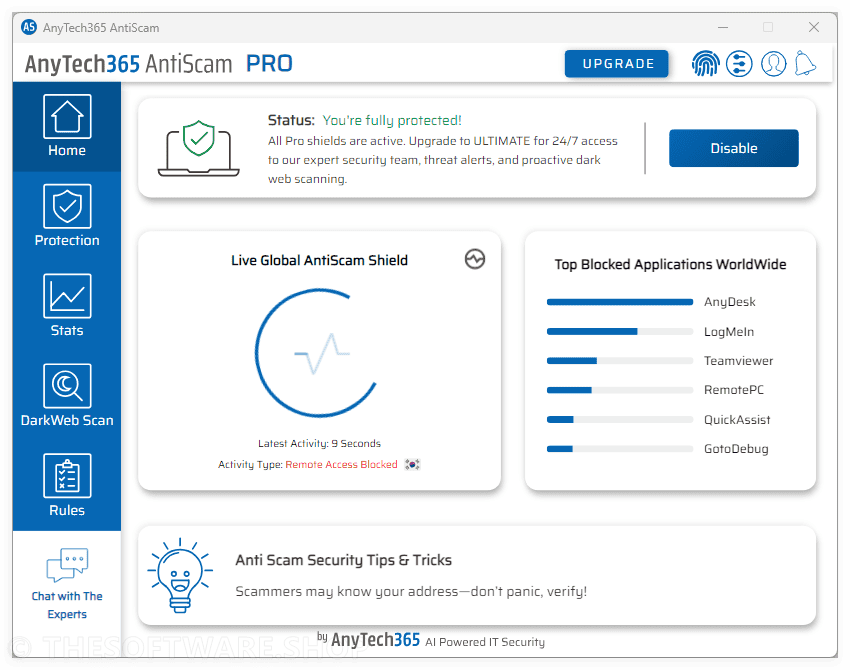
Online fraud has shifted from “virus-only” threats to fast, convincing tricks that pressure people into clicking, calling, paying, or giving away logins in seconds. One wrong tap on a fake support page, a look‑alike bank login, or a “your package is delayed” message can lead to account takeovers, card fraud, and weeks of recovery work. AnyTech365 AntiScam PRO focuses on preventing these modern attacks before they turn into real damage.
AnyTech365 AntiScam PRO builds on the essential coverage of AntiScam Free and adds proactive layers designed for real-world scam scenarios. You get browser-level phishing and link protection, unlimited Dark Web scans to spot leaked credentials early, and tamper-resistant safeguards that help keep protection active during an incident. When a situation feels urgent, 24/7 premium phone and chat support connects you to scam‑response specialists who can guide the next steps with clarity.
What is AnyTech365 AntiScam PRO
AnyTech365 AntiScam PRO is an advanced cybersecurity solution designed to block scams before they can reach you. It combines real-time scam detection, phishing protection through a browser extension, identity monitoring via Dark Web scans, and expert human support. The result is continuous protection against common online fraud patterns.
Unlike tools that mainly respond after malware appears, AntiScam PRO focuses on scam prevention and early warning. Many modern incidents start with a link, a fake page, or a remote-access prompt that looks legitimate. AntiScam PRO aims to disrupt those steps by warning or blocking risky pages and activity, while also checking if your emails, usernames, or domains show up in known breach data so you can react fast.
It also adds tamper-resistant safeguards designed to help keep the software running if an attacker tries to disable defenses during a live incident. That matters in remote-support scams, where criminals often attempt to remove security tools once they gain access. AntiScam PRO is built to keep key protections active so you can regain control with support.
AntiScam PRO and antivirus work well together as different layers. Antivirus is strong at identifying and removing known malicious files, while AntiScam PRO focuses on preventing phishing, fake support pages, credential theft, and scammer access attempts before they escalate. Used together, they provide broader coverage against both malware and fraud.
Key Benefits
The biggest value of AntiScam PRO is how it reduces risk during the moments that matter—when you are about to click, sign in, call a “support” number, or allow remote access. The benefits below focus on practical outcomes that help protect your device, accounts, and identity with less daily effort.
Prevents scam pathways with proactive blocking
Helps stop phishing links and fake support pages at the browser level
Monitors identity exposure using unlimited Dark Web scans
Keeps safeguards active with tamper-resistant disable/uninstall protection
Provides 24/7 premium phone and chat access to scam-response experts
Supports safer online banking, shopping, remote work, and account management
This product is made for people who want prevention first, not cleanup later. Antivirus tools are valuable for malware detection, but many scams succeed without traditional “infection” signals, using social engineering, fake pages, and credential theft. AntiScam PRO complements antivirus by targeting the scam pathways—web links, remote-access attempts, suspicious sessions, and exposed logins—so you can browse, shop, bank, and work with confidence.
AntiScam PRO is especially useful for families, seniors, remote workers, and anyone who manages sensitive accounts. It’s also a strong fit for busy users who want protection that runs quietly in the background, plus a reliable human backstop when something looks wrong. If your goal is to block fraud attempts early and reduce the risk of identity theft, AntiScam PRO delivers a practical, layered defense.
8.5Expert Score
Practical protection against scams
If you want protection designed around real scam behavior—phishing links, fake support pages, remote-access tricks, and credential theft—AnyTech365 AntiScam PRO provides a layered approach that stays active and adds live expert help when you need it most. It’s lightweight, runs quietly, and focuses on prevention so you can spend less time worrying about suspicious messages and more time using your device with peace. SEO keywords: AnyTech365 AntiScam PRO, anti scam software, phishing protection, browser extension security, dark web monitoring, identity theft protection, scam prevention, remote access scam protection, fake support page blocker, credential leak scan, data breach monitoring, Windows security tool, real time scam detection, tamper resistant security, uninstall protection security, scam response support, 24/7 cybersecurity support, online fraud protection, secure web browsing, safe online banking, safe online shopping, account takeover prevention, link protection tool, email breach scan, family online safety
Features
Below is a comprehensive list of the key features that make the software a valuable addition to your needs: each item is designed to reduce scam risk before it turns into lost money, stolen credentials, or account takeover. You get protection at multiple points—device activity, browser activity, identity exposure, and live guidance—so you’re not relying on a single control.
FullProtection: Real-time monitoring of remote sessions and network activity with active blocking and alerts
RemoteSessionWatch: Detects suspicious remote-control behavior often used in support scams
NetworkActivityAlerts: Flags unusual patterns so you can respond before damage spreads
ActiveBlocking: Stops high-risk actions instead of only showing notifications
BrowserExtension: Detects phishing pages, malicious links, and warns or blocks unsafe webpages and forms
PhishingLinkBlock: Intercepts known and suspicious links before you interact
FakeSupportPageWarn: Helps prevent calls to fraudulent “tech support” pages
FormSafetyChecks: Adds warnings for risky sign-in and data-entry flows
DarkWebScans: Unlimited manual and scheduled scans to check emails, usernames, and domains against known breaches
ScheduledChecks: Runs routine scans so you don’t have to remember
MultiIdentifierScan: Tracks several accounts and identifiers for broader coverage
EarlyLeakSignals: Helps you reset passwords quickly after breach exposure
TamperResistance: Helps prevent attackers from disabling or removing safeguards during an incident
DisableDefense: Adds resistance against forced shutdown attempts
UninstallProtection: Reduces the chance of removal by unauthorized users
ServicePersistence: Helps keep essential services running for continuity
AppControlRules: Flexible rule engine plus advanced profiles for trusted/blocked applications and scheduled policies
TrustedProfiles: Allows approved tools while limiting risky ones
BlockedProfiles: Restricts unwanted or suspicious apps that scammers may install
ScheduledPolicies: Applies rules at set times to fit work or family routines
Requirements
To keep protection active and monitoring accurate, AntiScam PRO needs a compatible Windows system and a working internet connection. These requirements are modest so the software can stay unobtrusive while still providing real-time checks and support access.
Operating system: Windows 10 or newer
Disk space: 110 MB
Internet connection: Required for real-time protection, monitoring, and support
Downloads
See how AnyTech365 AntiScam PRO fits your daily browsing and sign-in habits by starting with the free AntiScam Free protection, then moving to PRO when you want the added layers.
Thanks for reading AnyTech365 AntiScam PRO Review & Enjoy the discount coupon. Please Report if AnyTech365 AntiScam PRO Discount Coupon/Deal/Giveaway has a problem such as expired, broken link, sold out, etc while the deal still exists.








![[NEW LINK #3] Giveaway – Abelssoft BankingBrowser 2026: Free Full Version | Lifetime Use – for Windows](https://thesoftware.shop/wp-content/uploads/thumbs_dir/Abelssoft-BankingBrowser-Review-Download-Full-Version-Software-Giveaway-rfosmaovwlqug3zpm81w967o5qknpo0wj7ser5ymjc.png)

